Back Office: Enterprise - Reports
- Sign into the Back Office.
- On the left-side Navigation Panel, click Enterprise. Then click Enterprise Reports.
- Under Enterprise Reports are options to access specific reporting Dashboards:
Sale Report
The Sale Report dashboard contains reporting of sales broken down by the name of each tab: Departments, Categories, Sub Categories, Menu Items, Modifiers, Hourly Sales, Daily Sales, Sale Recap (most recent business day), Cashier Out (most recent business day), Weekly Summary, Sale Summary, Enterprise Detailed Report (can only be viewed via Export to Email), and Online Sales.
- Each reporting tab allows for filtering by various settings - including individual Stores, Departments, Categories, Sub Categories, Menu Items, etc. and to narrow the results by various Time Periods.
- Most reports include graphs representing Top Sales, Sales By Hour, and a more detailed table view of the data that allows for exporting.
- If a Split By… box is selected before Apply is clicked, more detailed information will be displayed – broken down by the identified value in the field. The below example is Split By MenuItem from the Categories tab.
- For the Sub Categories tab: if the Detailed View box is selected before Apply is clicked, it provides a more detailed breakdown of each listed Sub Category result.
- On the Hourly Sale report, if a + sign is clicked next to a Time, it’s expanded to show the sales during that hour, broken down by Server. Click the Time again to collapse the row and show the + again.
Employee
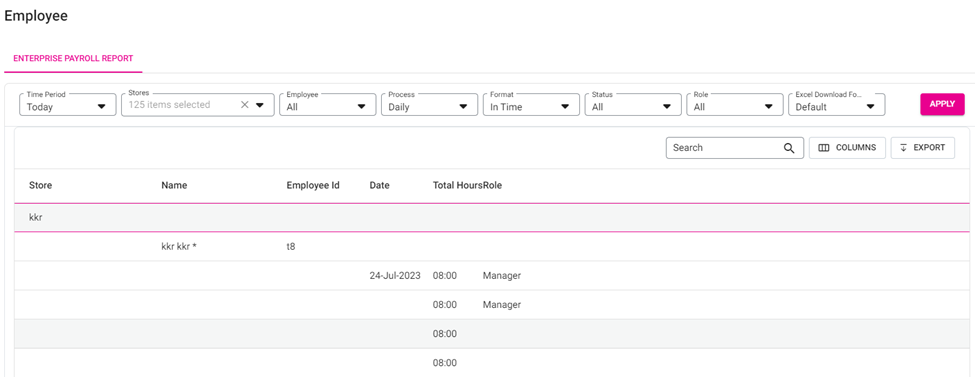
The Employee dashboard contains the Enterprise Payroll Report, where you can view an overview of the payroll. The report can be broken down by Time Period, Store, Employee, Process (recurring), Format, Status and Role. Also, you can select the formatting of the Excel file to download.
Gift Card
The Gift Card dashboard contains information on Gift Card redemption.
View the results broken down by Stores, Card Number, and Activity Type (In-Store or Online) – within a specific Time Period. Click the Group by Store box to organize the results by a specific Store. Click Apply to generate the results.
Royalty/Franchise
- Royalty – Contains sale information about paying out Royalties. The data is broken down by Store, with information on the Sales Subjected to Royalties, and the Royalty Fees. The report can be exported, with the file being directly downloaded or emailed.
- Select from the following fields and Time Period.
- Filter Stores By – Select from the dropdown.
- Selected [Options] – Select one or more options based on the Filter Stores By selection (click Select All to Select/Deselect all options).
- Selected Discounts – Select one or more options based on the Filter Stores By selection (click Select All to Select/Deselect all options).
- Exclude Loyalty Redemption – If selected, Loyalty Points will not be included. If deselected (default) they will be included.
- Click Apply. A table with the below columns appears, displaying values based on your selections:
- Store Name: The name of the Store.
- Business Date: The Date the Royalty Fee was applied.
- Net Sales: The Net Sale value (up to 2 decimal points).
- Net Sale = Gross Sale - Tax - Discount - Discount Tax - Void - Void Discount Tax
- Chargeable Discounts: Any Chargeable Discount amount from the Sale Recap Report.
- Loyalty Redemption: Any Loyalty Redemption amount from the Sale Recap Report
- Royalty Subjected Amount: The Royalty Subjected amount based on the following:
- If the Exclude Loyalty Redemption box is selected, the formula will be: Royalty Amount = (Net Sale - Loyalty Redemption + Chargeable Discount).
- If deselected, the formula will be: Royalty Amount = (Net Sale + Chargeable Discount).
- Royalty Fee: The value based on the formula Royalty Subjected Amount x Royalty Percentage.
- Gift Card Sold: Total amount of all sold gift cards.
- Gift Card Redeemed: Total amount of all redeemed gift cards.
- Total Due: User can view Total Due for that particular Store / Group / City / State / ZIP Code. Formula to get: Royalty amount + GC Sold - GC Redeemed.
- ACH Report – Contains sale information about ACH Transactions and Royalties.
- Select from the following fields and Time Period.
- Filter Stores By – Select from the dropdown.
- Selected [Options] – Select one or more options based on the Filter Stores By selection (click Select All to Select/Deselect all options).
- Selected Discounts – Select one or more options based on the Filter Stores By selection (click Select All to Select/Deselect all options).
- Credit Entry Class – Select PPD or CCD for the type of transaction.
- PPD (Prearranged Payment and Deposit): ACH transactions that involve a consumer account
- CCD (Corporate Credit or Debit): ACH transactions between businesses or other organizations
- Credit/Debit – Select to display Credit or Debit transactions (or Both).
- Exclude Loyalty Redemption – If selected, Loyalty Points will not be included. If deselected (default) they will be included.
- Click Apply. A table with the below columns appears, displaying values based on your selections:
- Store Name: The name of the Store.
- Business Date: The Date the Royalty Fee was applied.
- Net Sales: The Net Sale value (including up to 2 decimal points).
- Net Sale = Gross Sale - Tax - Discount - Discount Tax - Void - Void Discount Tax
- Discount: The total value of applied Discounts (negative value, up to 2 decimal points).
- Bank: The name of the Bank.
- Fees %: The percentage applied for Fees.
- Royalty Fees: The value from the formula Royalty Subjected Amount x Royalty Percentage.
- Total: The total in Royalty Fees.
- Download ACH Transaction File – Click the button to download the file. It contains the following information about ACH Transactions: Destination name, Destination Routing Number, Immediate Origin Name, Immediate Origin Number, Company Name, Company Entry Description, Company Discretionary Data, Company Identification Number, Originating DFI Identification
Loyalty
Contains information on Loyalty Point accrual and redemption. The data is broken down by Customer, with information on their Total Accumulated and Redeemed Points, and their Current Available Points. The report can be exported, with the file being directly downloaded or emailed.
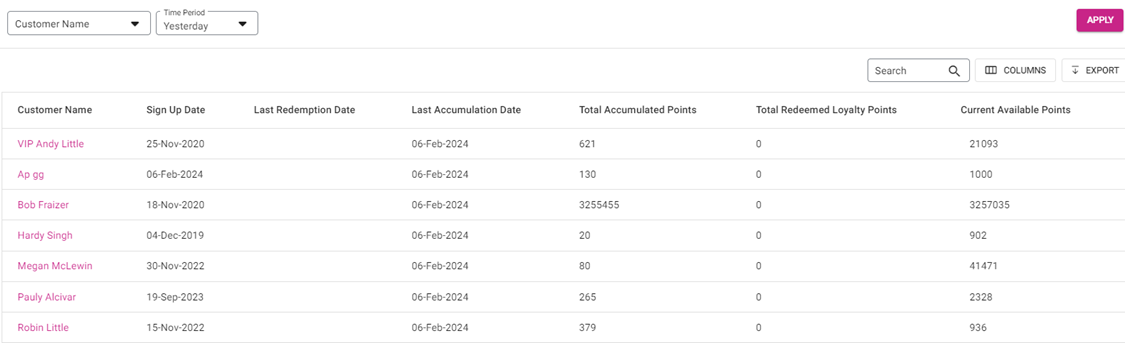
Click a Customer Name to view a screen containing a breakdown of their Loyalty Point accrual by transaction.
Exporting a Report
- Click Export. The Export pane appears.
- On the Export pane: select the file Format, then click Export at the bottom. The file [... Reportxxxxxxxxxxxxxxxxx] will be downloaded.
- Open the Export to view all info within one file.