POS: Check Options - Open Cash Drawer

POS: Check Options - Open Cash Drawer

Note: Only Employees with the proper Role and Permission settings have access to open the Cash Drawer.

  • On the Menu screen, select the  Option button at the bottom.

  • On the Check Options screen, select Open Cash Drawer.
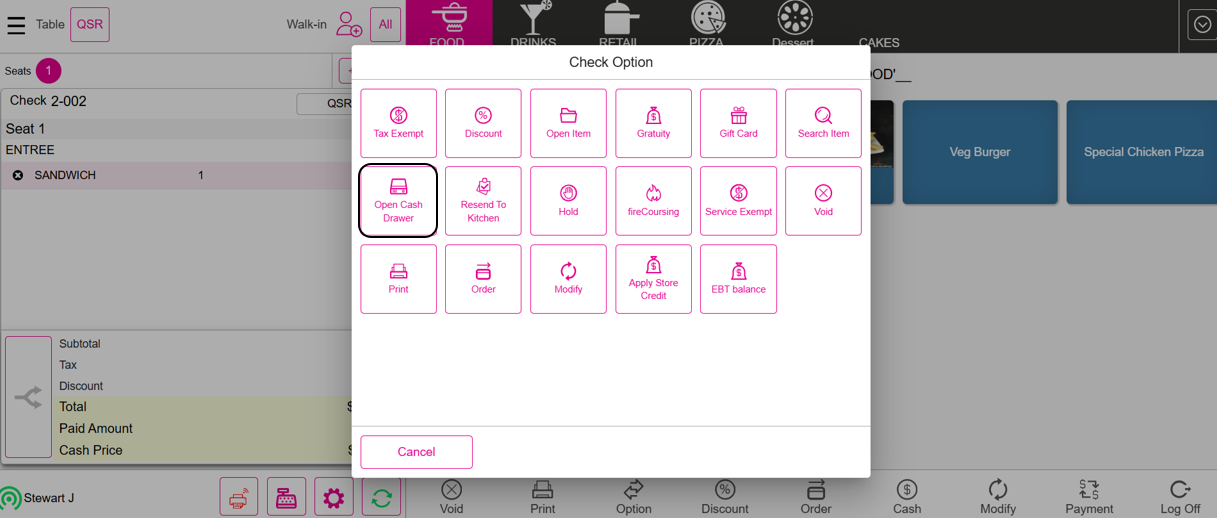

  • When Open Cash Drawer is selected, the Cash Drawer will open automatically.
      • Related Articles

      • Retail POS: Operation - Till Management (Open Cash Drawer Tab)

        The Open Cash Drawer tab is used to open the Cash Drawer. Note: Only Employees with the proper Role and Permissions settings have access to open the Cash Drawer. POS Settings Navigation: Log In POS then select POS Settings Dual Cash Drawer For the ...
      • POS: Operation - Till Management (Open Cash Drawer Tab)

        This option is used to open the Cash Drawer. Note: Only Employees with the proper Role and Permission settings have access to open the Cash Drawer. POS Settings Navigation: Log In POS then select POS Settings Dual Cash Drawer For the Enable Dual Cash ...
      • Retail POS: Operation - POS Settings

        Navigation: Log into POS, then select Operation > POS Settings Note: Only Employees with the proper Role and Permission settings have access to POS Settings. Till Settings This section is used to define the behavior of Till Management. Back Office ...
      • Retail POS: Receipt Options - Open Cash Drawer

        Note: Only employees with the proper Role and Permission settings have access to open the Cash Drawer. For more information, see the Open Cash Drawer Knowledge Article. Select the Option button at the bottom. On the Receipt Option screen, select Open ...
      • POS: Operation - Till Management

        Navigation: Log in to POS, then select Operations > Till Management Till is the money trays that fit into the Cash Drawers. They help Owners and Managers to keep track of the Cash that passes through their business daily. When ordering from the Order ...