Retail Back Office: Admin - Dealer Info
Navigation: Log into Back Office Admin, then select Dealer > Dealer Info
The Dealer Info page is broken down by the following tabs: Dealer Info (default) and SMTP Info.
Dealer Info
- Name - (Mandatory) The name of the Dealer will be shown here.
- Email ID - (Mandatory)The email of the Dealer will appear.
- Phone Number - The phone number of the Dealer will be shown.
- Address Line 1 - The number and street name of the dealer.
- Address Line 2 - Any extra address information of the dealer.
- City - The city of the dealer's address.
- State - The state of the dealer's address.
- ZipCode - The zip code of the dealer's address (numbers only).
- Country - The name of the country of the dealer's address.
Support URL - (Mandatory) The Support URL. (Tool Tip: 'This field cannot be empty please enter
back office url if you don’t have support url').
Support Phone Number - (Mandatory) The support phone number. Numbers only with a minimum of 6 digits and maximum of 15 digits.
Purchase URL - (Mandatory) The Purchase URL. (Tool Tip: 'This field cannot be empty please enter backoffice
url if you don’t have purchase url').
- Back Office URL - (Mandatory) Enter the URL to access the Back Office.
- Dealer URL - (Mandatory) This will be auto-populated and not editable.
- Customer Signup URL - This will be
clickable format when clicked this will navigate to another screen where that
displays the plan details.
- For the Icons/Logos (BO Login Screen, BO Application, Admin Page Logo, Web Browser Tab, Dealer POS Screen, and WebPOS Login Page): Click the Upload button (document with up arrow) to upload image from PC to represent the above options.
- The image should be either JPG or PNG format. The image should be a maximum file size of 2MB with a recommended resolution of 400 by 400.
- Theme - You will be able to choose the theme color from the display and this color will appear for all the screen under this dealer.
When ready and all mandatory fields are filled-in, click Save. A banner will appear, confirming the updates were made.
SMTP Info
This tab is for providing email configuration details.
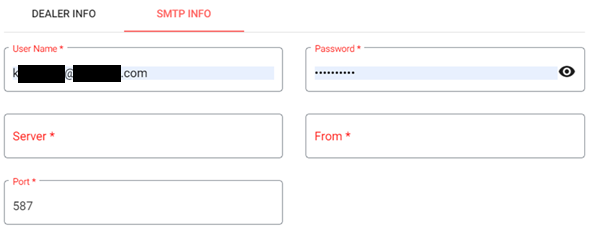
- User Name: (Mandatory) The user name (typically the email address). A maximum of 50 characters.
- Password: (Mandatory) The password for the user name. It should contain letters (with one capital letter), numbers, and at least one special character.
- Server: The email server (Example: Google Mail is smtp.gmail.com)
- From: From which server the mail will be directed
- Port: The port number to be accessed
When ready and all mandatory fields are filled-in, click Save. A banner will appear, confirming the updates were made.