Retail Back Office: Admin - Dealers Subscriptions
Navigation: Log in to Dealer
Admin, then select Dealers > Subscriptions
The Subscriptions page displays all subscribed customers in the form of a table with the following columns:
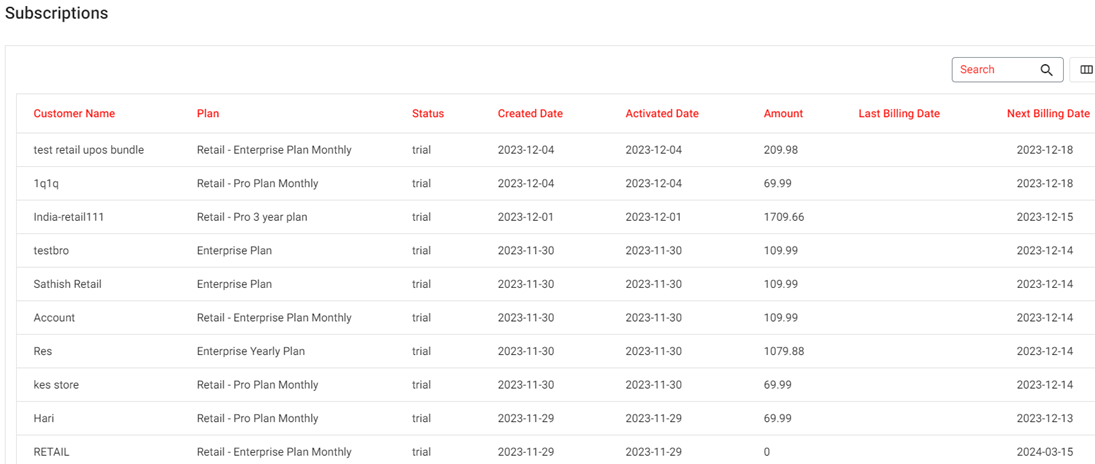
Customer - The name of the customer.
Plan - The subscription plan selected
by the Dealer.
Status - The status of the subscription.
Created Date - The date the subscription plan was created [YYYY-MM-DD format].
Activated Date - The date the subscription plan was activated [YYYY-MM-DD format].
Amount - The amount of the subscription plan.
Last Billing Date - The last billed amount plan date [YYYY-MM-DD format].
Next Billing Date - The next billing amount plan date [YYYY-MM-DD format].
Related Articles
Retail Back Office: Admin - Dealers Payments
Navigation: Log into Back Office Admin, then select Dealers > Payments The Payments page displays subscription payment information in the form of invoices. Select a Subscription then click Apply. If there is payment activity, it will populate the ...
Retail Back Office: Admin - Users
Navigation: Log in to Back Office Admin, then select Users The Users page displays all Admin Users under the Enterprise in the form of a table with the following columns: First Name - The admin user's first name Last Name - The admin user's last name ...
Retail Back Office: Admin - Announcements
Navigation: Log in to Back Office Admin, then select Announcements The Announcements page displays new features and updates to iPad, Web POS, Back Office, OLO and Subscriptions. The Announcements are displayed in table format which contains the ...
Retail Back Office: Admin - Dashboard
Navigation: Log in to Dealer Admin, then select Dashboard. On the Dashboard, you will be able to view the tiles displaying amounts such as the number of Stores using types of plans Core/Basic, Pro, and Enterprise - as well as Sales data broken down ...
June 2024 - Password Policy Changes for Admin Users
Password Changes for Dealer Admin Attached is a copy of this Article, including screenshots for a visual reference. Introduction: This document explains the new workflow of the Dealer Admin login page Current Workflow: The minimum required length for ...