POS: Gift Card Payments
A Gift Card sold from Back Office will ask to select an option for payment.
Back Office
Gift Card Maintenance
Navigation: For your Store, select Products/Items > Gift Card
- Gift Cards can be issued (sold), recharged, and have their values adjusted from the Back Office. Values are recorded in the Gift Card report as well as in the non-sale revenue section of the Sale Recap Report for the respective activities.
Payment Methods
Navigation: For your store, select Settings > Payments > Payment Method
For Gift Card to appear as a Payment Type option, the Payment Method Gift Card must be enabled in Back Office.
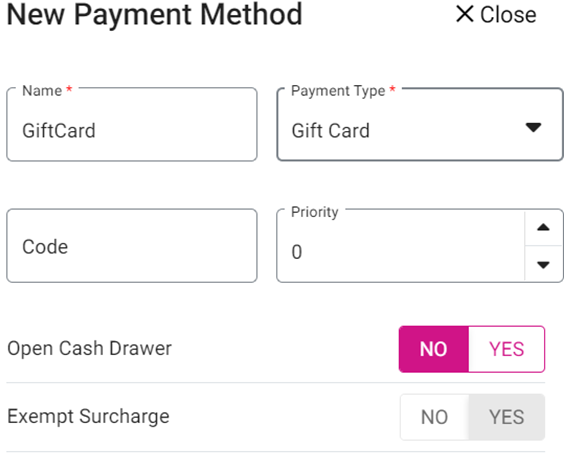
- When the Admin Gift Card toggle is Enabled, the Gift Card payment appears in Payment Settings under Store Settings.
- When Disabled, Gift Card payment won’t appear.
For more information on Payment Methods, see the Back Office Payment Method article.
Restrict Gift Card Tip
Navigation: Log into Staging Revamp, select a Store, then select Settings > General Settings
- If the Disable Gift Card Tip toggle is enabled (set to YES), a Gift Card Tip will not be allowed.
- If disabled the Tip will be allowed.
POS
Creating a Sale
- Select the Payment
option.
- The Payment screen appears, which displays all the payment options enabled in Back Office (BO) settings.
- Select Gift Card to perform a Gift Card payment.
- If a Tip is enabled: the Add A Tip screen appears where customers are redirected to provide a Tip in the form of Percentage (%), Custom amount or proceed with No Tip.
- Below the Tip section, the Signature line will be available based on settings in BO. After Tip selection and Signature, there will be three options - Cancel, Manual, Process payment at the bottom.
- If Process Payment is selected: the card can be tapped or swiped or inserted into the device, then payment will be completed.
- If Manual is selected, the Card screen appears where the Amount to be paid will be displayed. There are 4 options: Manual, Clear, Process, Cancel, and the amount to be paid is displayed. Manually enter the Card details then select Process or swipe or tap or insert the card (EMV).
- If no device is connected, the ‘Card reader is not connected’ message appears.
- After payment completion, the Show Digital Receipt screen will appear (if the Show Digital Receipt toggle is enabled in BO).
- On the Digital Receipt screen: select whether the Receipt / Bill needs to be sent via SMS, Email or Print, then press Send Receipt.
- The Receipt will be sent based on the selection, and you will be returned to the Order screen.
Creating a Sale - Tip Restricted
- Upon selecting a Menu Item and proceeding to payment, the Payment screen appears.
- Select the Gift Card option, enter the Tender Amount, then press Submit.
- The Payment Processing screen appears with the following options (this example doesn't show the Tip screen because the Tip option was disabled).
- Cancel – The payment process will be cancelled.
- Manual – Manually enter the details then proceed the payment.
- Clear – Entered data will be cleared.
- Process – Once Gift Card details are entered, then press Process to proceed with payment.
Void
To Void a payment after payment is completed: Delete the payment from the Payment screen, and the full payment will be voided.
- Partial void is not possible. All payments must be deleted from the Check to Void.
After closing the Check: it will appear in the Closed tab where it can be reopened to delete the payment, and the payment will be voided.
Receipt
The below Receipts will be supported by Star and Epson printers and for both Text and Image.
- Only the last 4 digits of the Card used for payment will appear on receipts.
- These Receipts apply to Front End, Merchant Copy, Customer Copy and Itemized Receipt.